
In DTF, film is a direct cost
A poorly packed Pet Film shows up at the end of the month.
Laying out every order by hand takes time you could spend printing, and waste adds up order after order.
DTReady builds the sheet for you and shows the layout before you export.
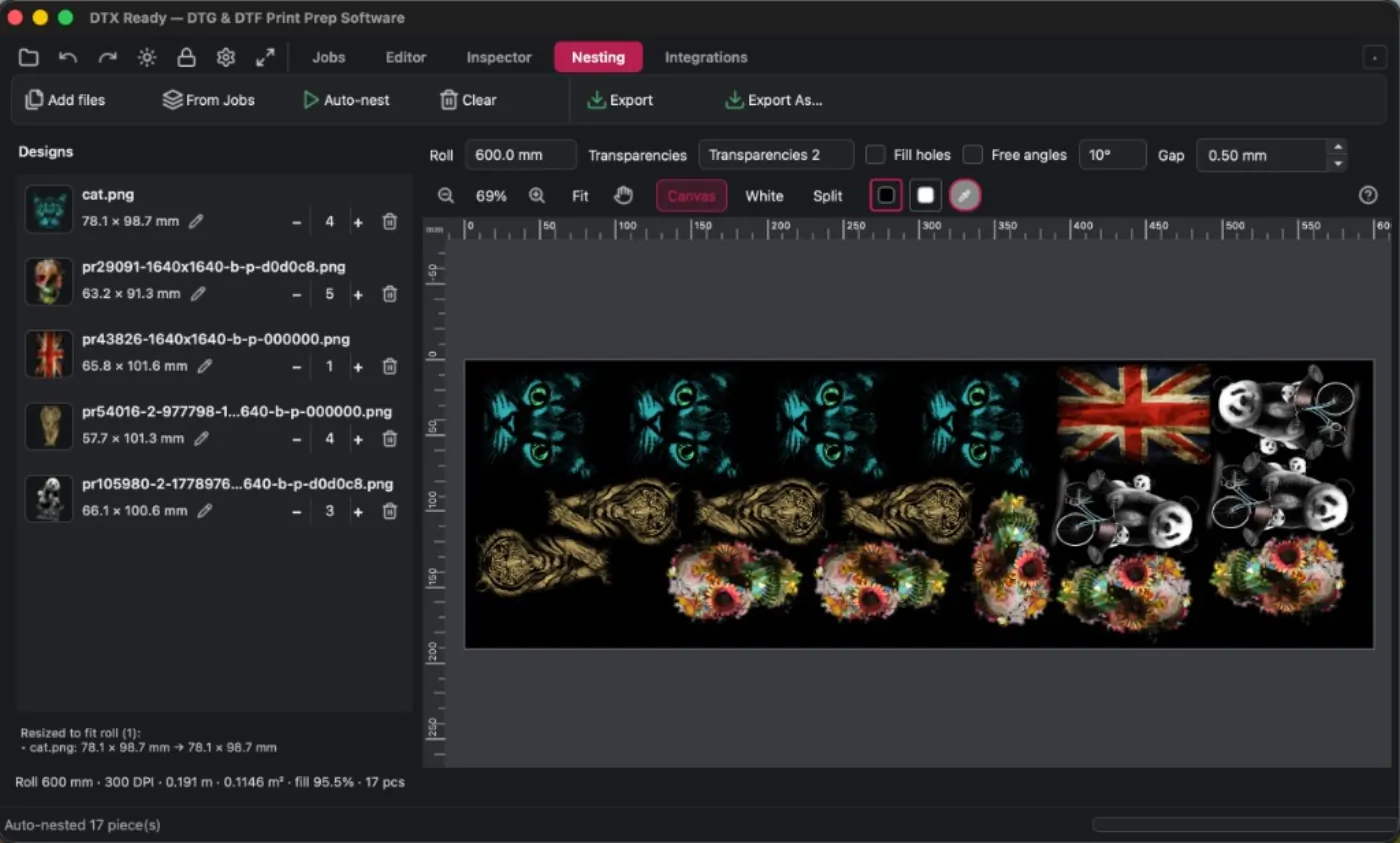
Automatic packing
The software tries different ways to place the designs and keeps the layout that uses Pet Film best. You set the roll width and the gap between pieces.
Quantities per design
Each design carries its own quantity. If a customer ordered six of one and two of another, you enter that and the Pet Film rebuilds with those repeats included — no manual re-layout.
Save the sheet and continue later
Nesting saves as .ndtr. Open it later to keep arranging, change quantities, or tweak the layout without starting over.
From the order to the Pet Film
Files already prepared in Jobs go straight into Nesting. When the flow comes from the store or a daily batch, designs arrive with their sizes and you only need to build the sheet.
Export the full Pet Film
The sheet comes out as a file ready for your RIP — TIFF, PNG, PSD, or another format in your flow — with everything you prepared inside. DTReady does not replace the RIP: it hands it a packed film.
Questions shops ask
What is DTF nesting / a gang sheet?
It is packing several designs onto one Pet Film so you print them in one pass. Nesting in DTReady does that automatically: it tries layouts, saves film, and shows the sheet before you export.
How do I get more out of every Pet Film roll?
By setting roll width, spacing between pieces, and quantities per design. DTReady looks for the layout that wastes the least film and lets you review it before sending it to your RIP.
Can I save the sheet and continue later?
Yes. Save the nesting as .ndtr and open it later to keep arranging or adjust quantities without starting over.
Can I set different quantities per design?
Yes. If an order needs six of one and two of another, you enter those counts and the sheet rebuilds with those repeats included.
Is this an online gang sheet builder?
No. It runs on your computer, in the same app where you already prepared halftones and the white layer. The sheet is built locally: artwork is not uploaded to assemble the layout.
Is DTReady a RIP?
No. Nesting exports the full Pet Film ready for the RIP you already use. You keep your RIP and printer driver exactly as they are.
Are my designs uploaded anywhere?
No. Everything runs on the shop computer. The sheet is built and exported locally.
Does it prepare DTF halftones too?
Yes. You prep the artwork first (cleanup, halftones, white), then Nesting builds the sheet — all in the same program.
Do I need Photoshop or pay per sheet?
No. DTReady is a standalone desktop app for Mac and Windows: you do not need Photoshop. Nesting is part of DTReady; you do not pay for each sheet you build.
Try it on a real order
Install it on Mac or Windows. 15 days with the full app; after that, the program stays free with basic DTF options — lifetime access. Build the sheet for an order you already know and compare how much film you use today.
If the halftones are not ready yet, start with DTF prep.